
🚀 Getting Started with OxMQ
The Production-Grade, Virtual Thread-Native Distributed Job Queue & DAG Engine for Java 17+ and Java 21+
Welcome to OxMQ! OxMQ brings the battle-tested power of BullMQ to the Java ecosystem, pairing official BullMQ Redis Lua scripts with Project Loom Virtual Threads on Java 21+ (with graceful platform thread fallback on Java 17 LTS) for high-throughput concurrent I/O.
📦 1. Installation
Add OxMQ to your project directly from Maven Central (globally available out-of-the-box with zero configuration), JitPack, or download standalone JARs from GitHub Releases.
Option 1: Maven Central (Global Standard — Zero Configuration)
Because OxMQ is published to Maven Central under io.github.gaurav10610, no custom repository blocks are needed. Simply add the dependencies directly:
Maven (pom.xml)
<dependencies>
    <!-- Core Pure Java Engine (Virtual Threads + Redis transport) -->
    <dependency>
        <groupId>io.github.gaurav10610</groupId>
        <artifactId>oxmq-core</artifactId>
        <version>1.8.0</version>
    </dependency>

    <!-- Optional: Spring Boot 3 Starter (@OxmqListener, Actuator) -->
    <dependency>
        <groupId>io.github.gaurav10610</groupId>
        <artifactId>oxmq-spring-boot-starter</artifactId>
        <version>1.8.0</version>
    </dependency>
</dependencies>
Gradle (build.gradle.kts)
dependencies {
    implementation("io.github.gaurav10610:oxmq-core:1.8.0")
    // or for Spring Boot 3 applications:
    // implementation("io.github.gaurav10610:oxmq-spring-boot-starter:1.8.0")
}
Option 2: JitPack (Zero-Auth GitHub Mirror)
No GitHub token or authentication required. Simply add the JitPack repository:
Maven (pom.xml)
<repositories>
    <repository>
        <id>jitpack.io</id>
        <url>https://jitpack.io</url>
    </repository>
</repositories>

<dependencies>
    <!-- Core Pure Java Engine (Virtual Threads + Redis) -->
    <dependency>
        <groupId>com.github.gaurav10610.oxmq</groupId>
        <artifactId>oxmq-core</artifactId>
        <version>1.8.0</version>
    </dependency>

    <!-- Optional: Spring Boot 3 Starter (@OxmqListener, Actuator) -->
    <dependency>
        <groupId>com.github.gaurav10610.oxmq</groupId>
        <artifactId>oxmq-spring-boot-starter</artifactId>
        <version>1.8.0</version>
    </dependency>
</dependencies>
Gradle (build.gradle.kts)
repositories {
    mavenCentral()
    maven { url = uri("https://jitpack.io") }
}

dependencies {
    implementation("com.github.gaurav10610.oxmq:oxmq-core:1.8.0")
    // or for Spring Boot 3 applications:
    // implementation("com.github.gaurav10610.oxmq:oxmq-spring-boot-starter:1.8.0")
}
Option 2: GitHub Packages Registry
To consume official io.oxmq artifacts from GitHub Packages:
Maven (pom.xml & ~/.m2/settings.xml)
<!-- In your pom.xml -->
<repositories>
    <repository>
        <id>github</id>
        <url>https://maven.pkg.github.com/gaurav10610/oxmq</url>
    </repository>
</repositories>

<dependencies>
    <dependency>
        <groupId>io.github.gaurav10610</groupId>
        <artifactId>oxmq-core</artifactId>
        <version>1.8.0</version>
    </dependency>
    <!-- or for Spring Boot 3: -->
    <!--
    <dependency>
        <groupId>io.github.gaurav10610</groupId>
        <artifactId>oxmq-spring-boot-starter</artifactId>
        <version>1.8.0</version>
    </dependency>
    -->
</dependencies>
Note: GitHub Packages Maven registry requires authentication. Add your GitHub Personal Access Token (
read:packagesscope) to your~/.m2/settings.xml:xml<settings> <servers> <server> <id>github</id> <username>YOUR_GITHUB_USERNAME</username> <password>YOUR_GITHUB_PAT</password> </server> </servers> </settings>
Gradle (build.gradle.kts)
repositories {
    mavenCentral()
    maven {
        url = uri("https://maven.pkg.github.com/gaurav10610/oxmq")
        credentials {
            username = project.findProperty("gpr.user") as String? ?: System.getenv("GITHUB_ACTOR")
            password = project.findProperty("gpr.key") as String? ?: System.getenv("GITHUB_TOKEN")
        }
    }
}

dependencies {
    implementation("io.github.gaurav10610:oxmq-core:1.8.0")
    // implementation("io.github.gaurav10610:oxmq-spring-boot-starter:1.8.0")
}
Option 3: Pre-built Release JARs
Direct download links from GitHub Releases v1.8.0:
🗄️ 2. Starting Redis
OxMQ works with any standard Redis 6.2+, Redis 7.x, or Valkey instance.
# Option A: Single Redis instance via Docker
docker run -d --name oxmq-redis -p 6379:6379 redis:7-alpine

# Option B: Full local observability stack (Redis + Bull-Board + Prometheus + Grafana)
docker compose up -d
🔄 3. Understanding the Job Lifecycle
Every OxMQ job transitions through a strictly enforced, atomic state machine managed by official BullMQ Lua scripts:
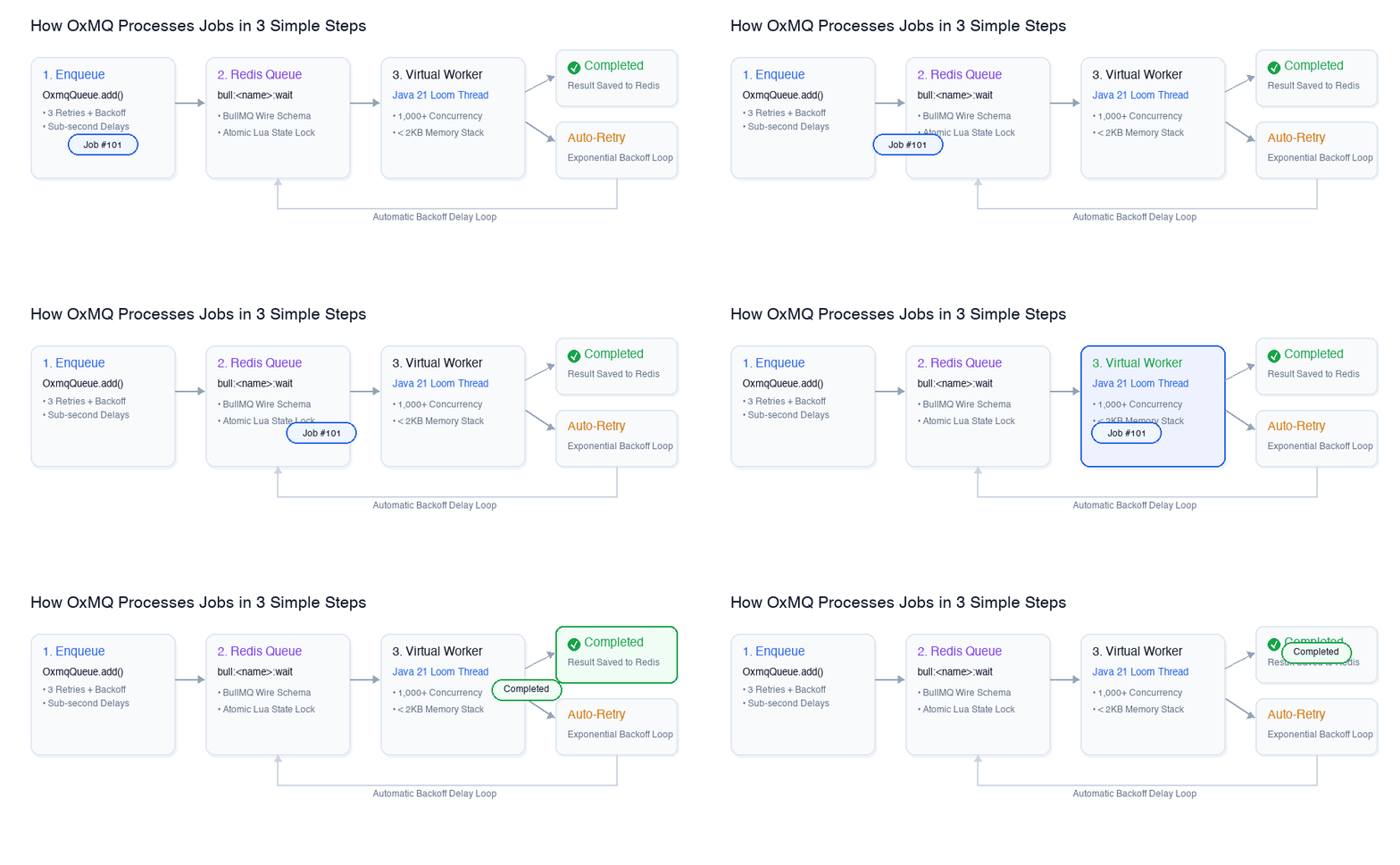
WAITING: Ready to be claimed by an available worker.ACTIVE: Locked and being executed by a worker Virtual Thread.DELAYED: Scheduled for future execution via Redis sorted set timestamps.WAITING_CHILDREN: A parent DAG job waiting for all child jobs to complete.COMPLETED: Successfully finished, storing its return value in Redis hash.FAILED: Exhausted all retry attempts or failed with non-recoverable error.
📤 4. Producing Jobs
OxMQ natively serializes Java 17/21 record and POJO classes to JSON.
import io.oxmq.OxmqQueue;
import io.oxmq.model.Job;
import io.oxmq.model.JobOptions;
import java.time.Duration;

// 1. Define your payload (Java 17/21 Records natively supported)
public record OrderInvoice(String orderId, String customerEmail, double amount) {}

public class InvoiceProducer {
    public static void main(String[] args) {
        // 2. Initialize Queue
        OxmqQueue<OrderInvoice> queue = OxmqQueue.<OrderInvoice>builder()
                .name("order-invoices")
                .redisUri("redis://localhost:6379")
                .payloadClass(OrderInvoice.class)
                .build();

        // 3. Enqueue with 5-second delay, 3 retries, exponential backoff, and KeepJobs memory pruning
        Job<OrderInvoice> job = queue.add(
                "generate-pdf",
                new OrderInvoice("ord_9876", "customer@example.com", 249.99),
                JobOptions.builder()
                        .delay(Duration.ofSeconds(5))
                        .attempts(3)
                        .exponentialBackoff(Duration.ofSeconds(1), Duration.ofSeconds(30))
                        .removeOnComplete(KeepJobs.of(1000, Duration.ofHours(2)))
                        .removeOnFail(KeepJobs.age(Duration.ofDays(7)))
                        .build()
        );

        System.out.println("Enqueued job ID: " + job.getId());
    }
}
Job Options Reference
| Option | Method | Description |
|---|---|---|
| Delay | .delay(Duration.ofSeconds(10)) | Schedule job execution in the future. |
| Retries | .attempts(3) | Maximum number of retry attempts. |
| Exponential Backoff | .exponentialBackoff(initial, max) | Doubles delay per retry attempt up to max. |
| Fixed Backoff | .fixedBackoff(Duration.ofSeconds(5)) | Constant delay between retries. |
| Custom Job ID | .jobId("idempotent-order-123") | Deduplication key to avoid duplicate execution. |
| LIFO | .lifo(true) | Last-in, first-out execution priority. |
| Priority | .priority(1) | Lower integer = higher priority dispatch. |
| Memory Pruning | .removeOnComplete(KeepJobs.of(1000, age)) | Structured Redis memory retention policy. |
| Failure Policies | .failParentOnFailure(true) | Immediately fail parent DAG workflow if child fails. |
⏱️ 5. Request-Reply: Awaiting Completion (waitUntilFinished)
To turn an asynchronous background job into a synchronous or reactive request-reply call (e.g. inside a REST API):
// Synchronous (Virtual-Thread Safe on Java 21)
try {
    Object result = job.waitUntilFinished(queueEvents, Duration.ofSeconds(15));
    System.out.println("Computation output: " + result);
} catch (TimeoutException e) {
    System.err.println("Timed out waiting for worker");
}

// Or Asynchronous / Reactive (CompletableFuture)
CompletableFuture<Object> future = job.waitUntilFinishedAsync(queueEvents, Duration.ofSeconds(30));
future.thenAccept(output -> System.out.println("Async result: " + output));
⚡ 6. Consuming Jobs with Virtual Threads
Because OxMQ runs natively on Java 21 Project Loom (Virtual Threads) (with automatic platform thread pool fallback on Java 17 LTS), you can configure high concurrency without exhausting operating system carrier threads.
import io.oxmq.OxmqWorker;
import java.util.Map;

public class InvoiceConsumer {
    public static void main(String[] args) {
        // Initialize Worker with 100 Virtual Threads
        OxmqWorker<OrderInvoice> worker = OxmqWorker.<OrderInvoice>builder()
                .queueName("order-invoices")
                .redisUri("redis://localhost:6379")
                .payloadClass(OrderInvoice.class)
                .concurrency(100) // 100 concurrent Virtual Threads!
                .processor(job -> {
                    OrderInvoice invoice = job.getData();
                    System.out.printf("Processing order %s (VirtualThread: %b)%n",
                            invoice.orderId(), Thread.currentThread().isVirtual());

                    // Real-time progress updates (reflected live in Bull-Board)
                    job.updateProgress(25);
                    job.log("Fetching order line items...");

                    // Blocking I/O does NOT block carrier threads
                    job.updateProgress(75);
                    job.log("Generating PDF and uploading to S3...");

                    job.updateProgress(100);
                    return Map.of("status", "SUCCESS", "invoiceId", "INV-" + invoice.orderId());
                })
                .build();

        worker.start();
    }
}
🌲 6. Parent-Child DAG Workflows (FlowProducer)
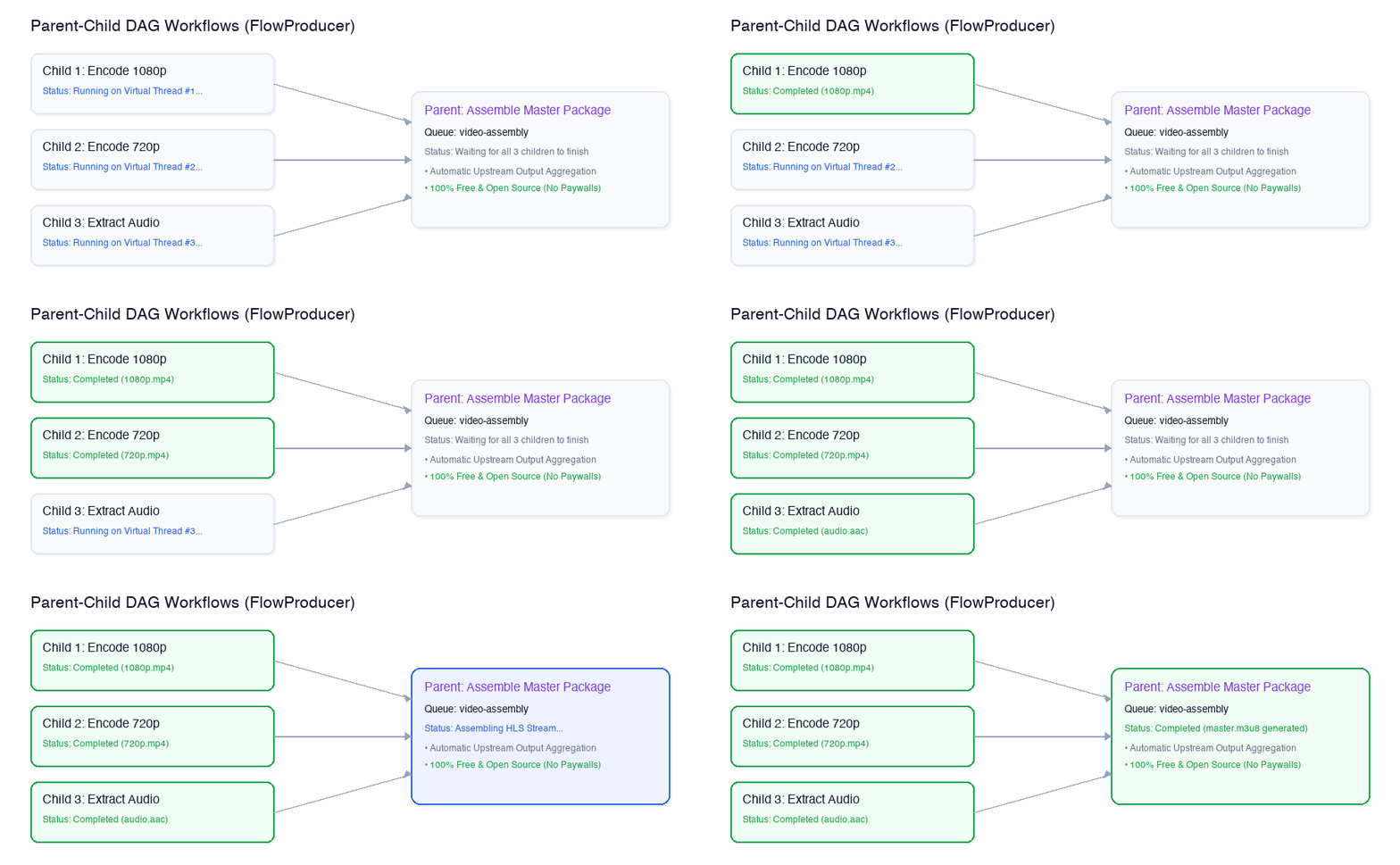
OxMQ includes a zero-dependency, atomic DAG workflow engine. A parent job automatically enters WAITING_CHILDREN and is activated in Redis only after all parallel child tasks succeed:
import io.oxmq.FlowProducer;
import io.oxmq.model.FlowJob;

FlowProducer flowProducer = new FlowProducer("redis://localhost:6379");

// 1. Define child tasks that run in parallel
FlowJob<VideoChunk> child1 = FlowJob.of(
        "video-chunks", "encode-1080p", new VideoChunk("vid_101", "1080p"));

FlowJob<VideoChunk> child2 = FlowJob.of(
        "video-chunks", "encode-720p", new VideoChunk("vid_101", "720p"));

// 2. Define parent job waiting on child completion
FlowJob<VideoAssembly> parentJob = FlowJob.of(
        "video-assembly", "stitch-and-publish", new VideoAssembly("vid_101"))
        .addChild(child1)
        .addChild(child2);

// 3. Atomically enqueue single DAG into Redis
String rootJobId = flowProducer.add(parentJob);

// Or submit an atomic batch of multiple DAG workflow trees:
List<String> rootJobIds = flowProducer.addBulk(List.of(parentJob1, parentJob2));
When each child worker completes, BullMQ's Lua scripts record the child result into the parent's childrenValues hash and decrement its pending dependency count. When all children finish, the parent is atomically moved to WAITING with zero external schedulers!
⚡ 7. High-Throughput Batch Dequeue (OxmqBatchWorker)
For database ingestion into systems like ClickHouse, Elasticsearch, PostgreSQL (JDBC batch), or Snowflake, OxMQ provides OxmqBatchWorker to dequeue up to $N$ jobs in a single Redis transaction:
import io.oxmq.OxmqBatchWorker;
import java.time.Duration;
import java.util.List;

OxmqBatchWorker<ClickstreamEvent> batchWorker = OxmqBatchWorker.<ClickstreamEvent>builder()
        .queueName("clickstream-events")
        .redisUri("redis://localhost:6379")
        .batchSize(100)                      // Dequeue up to 100 jobs at once
        .batchTimeout(Duration.ofMillis(200)) // Or flush every 200ms
        .processor(batch -> {
            // Write entire batch to ClickHouse in 1 bulk insert
            clickHouseService.bulkInsert(batch);
            return "INSERTED_" + batch.size();
        })
        .build();

batchWorker.start();
⏱️ 8. Sliding-Window Rate Limiting
Protect external APIs (OpenAI, Stripe, Shopify, Twilio) from HTTP 429 rate limit bans with distributed token-bucket rate limiting:
OxmqWorker<AiPrompt> worker = OxmqWorker.<AiPrompt>builder()
        .queueName("openai-prompts")
        .redisUri("redis://localhost:6379")
        .rateLimit(60, Duration.ofMinutes(1)) // Max 60 requests per minute across all instances
        .processor(job -> openAiService.complete(job.getData()))
        .build();

worker.start();
🍃 9. Spring Boot 3 Integration (oxmq-spring-boot-starter)
OxMQ provides zero-boilerplate autoconfiguration for Spring Boot 3 with native Context Isolation:
application.yml
spring:
  application:
    name: order-service     # Automatically isolated under order-service:bull:* in shared Redis!

oxmq:
  namespace: order-service # Optional explicit override
  redis:
    uri: redis://localhost:6379
  default-concurrency: 50
  virtual-threads: true     # Virtual Threads on Java 21+ (platform threads on Java 17)
  metrics-enabled: true
  max-len-events: 10000    # Bounds Redis event stream
  default-job-options:     # Automatic queue retention
    remove-on-complete:
      count: 1000          # Keep last 1,000 completed jobs
    remove-on-fail:
      count: 5000          # Keep last 5,000 failed jobs
Application Code
@SpringBootApplication
@EnableOxmq
public class OrderApplication {

    public static void main(String[] args) {
        SpringApplication.run(OrderApplication.class, args);
    }

    @Component
    public static class OrderEventListener {

        @OxmqListener(queue = "order-invoices", concurrency = 50)
        public String handleInvoice(Job<OrderInvoice> job) {
            job.updateProgress(50);
            job.log("Invoice processed successfully");
            return "SUCCESS";
        }
    }
}
🖥️ 10. Instant Bull-Board Web UI
Because OxMQ uses BullMQ's standard Redis schema, you can inspect your queues using Bull-Board:
# Run standalone via npx
npx @bull-board/cli --redis redis://localhost:6379 --queues order-invoices,video-chunks,video-assembly
Open http://localhost:3000 to inspect queue counts, live jobs, step logs, and manually trigger retries.
🙏 Attribution
OxMQ is proud to reuse the official, battle-tested Lua scripts developed by the open-source BullMQ community under the permissive MIT license. Full attribution details can be found in BULLMQ_ATTRIBUTION.md.
👤 Author & Maintainer
OxMQ is architected and maintained by Gaurav Kumar Yadav (@gaurav10610).